

In a digital world where cyber threats are increasingly sophisticated and enterprise systems deeply interconnected, protecting communication between applications is no longer optional—it’s essential. Whether you're integrating REST/SOAP APIs, building microservices, or working with identity platforms like Oracle Identity Manager (OIM), ensuring that onlytrusted and authenticated systemsexchange data is mission critical.
This is whereTwo-Way SSL (Mutual TLS)comes into play. It provides not only encryption but alsomutual authenticationbetween systems. In this blog, we’ll walk through what Two-Way SSL is, why it's necessary, and how to implement it for WebLogic and OIM.
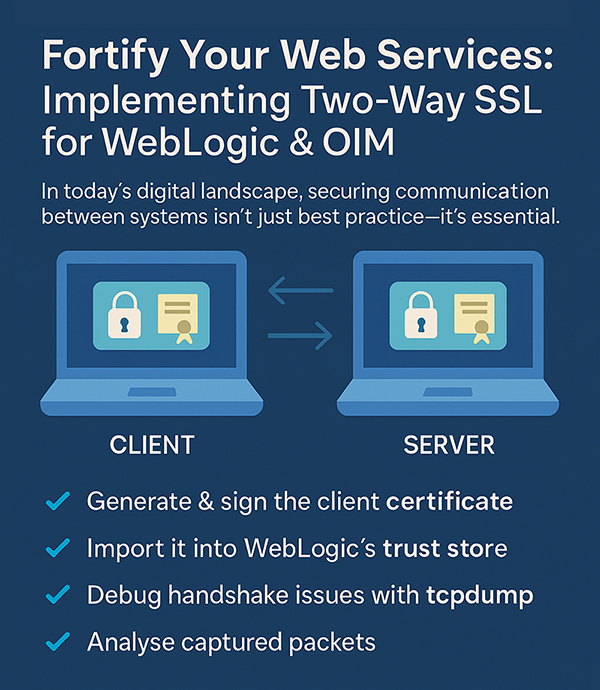
What is Two-Way SSL (Mutual TLS)?
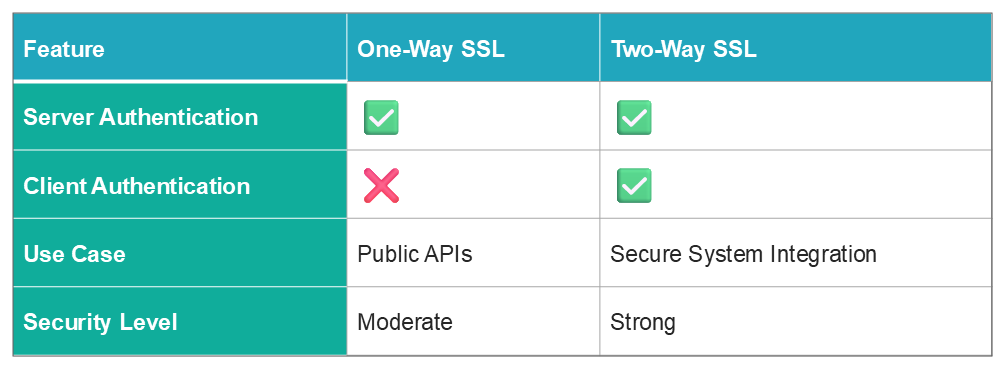
One-Way SSLis commonly used to protect publicly exposed services. In this setup, the client authenticates the server using its certificate, but the server does not verify the client. While this suffices for many public APIs or browser access, it does not meet the security needs of internal services or sensitive data flows.
Two-Way SSL, on the other hand, ensures thatboth the client and the server present valid certificates during the SSL handshake. This mutual authentication guarantees:
- The server is only accessible to authorized clients
- The server itself is verified and trusted by the client
- All data is encrypted while in transit
Why You Should Use Two-Way SSL
Two-Way SSL is especially critical when securing high-risk enterprise environments such as:
- Oracle Identity Manager (OIM) WebService Connectors
- Internal REST/SOAP APIs hosted on WebLogic
- Enterprise microservices and backend service integration
- HRMS, ERP, and financial platform connectors
These integrations often involveprivileged operations and sensitive user data, making strong authentication and encryption non-negotiable.
Step-by-Step Guide: Configuring Two-Way SSL in WebLogic
Configuring Two-Way SSL requires preparing both theWebLogic serverand theclient(e.g., OIM or an API consumer). Here's how to get started:
1
Create and Sign a Client Certificate
- Generate a private key and certificate signing request (CSR) on the client side.
- Submit the CSR to a trusted Certificate Authority (CA) or use an internal CA to sign the client certificate.
2
Import the Client Certificate into WebLogic’s Trust Store
To allow WebLogic to authenticate the client:
- Import the client certificate, or
- Import the CA certificate that issued the client cert
into the server'strust store.
3
Enable SSL and Client Authentication in WebLogic
- Access the WebLogic Admin Console.
- Go toEnvironment > Servers > > Configuration > SSL.
- Enable SSL and setClient Authenticationto Two Way.
- Ensure identity and trust keystores are correctly configured with valid file paths and credentials.
4
Configure the Client to Present Its Certificate
Make sure the client:
- Loads its own client certificate and private key
- Trusts the server certificate or its issuing CA
- Uses a compatible TLS version (TLS 1.2 or 1.3 is recommended)
5
Validate the SSL Handshake
- Use tools such asPostman,OpenSSL, orcurl, and analyze WebLogic logs to confirm both certificates are exchanged successfully, and the SSL handshake completes as expected.
Best Practices for Two-Way SSL
- UseTLS 1.2 or 1.3; avoid legacy protocols like SSL 3.0 or TLS 1.0
- KeepCA chains and trust stores up to date
- Monitor and renew certificatesbefore they expire
- Enable WebLogic debug logs (-Dweblogic.debug.DebugSecuritySSL=true) for deeper visibility
- Configure strongcipher suitesaligned with your organization’s security standards
Troubleshooting SSL Handshake Failures
Even when configured correctly, SSL handshakes may fail due to various factors. Here’s how to debug common issues:
1
Check WebLogic SSL Logs
Enable verbose logging and watch for errors related to:
- Certificate verification
- TLS protocol negotiation
- Handshake timeouts or dropped connections
Logs can reveal whether the client’s certificate was missing, expired, or untrusted.
2
Capture Network Traffic Using tcpdump
To perform a deeper inspection, use: sudo tcpdump -i any -w outputfile.pcap. This creates a .pcap file capturing the SSL handshake. Analyze it usingWiresharkor upload it toapackets.comto check:
- If certificates were correctly exchanged
- TLS version compatibility
- Specific handshake failure points (timeouts, mismatches, etc.)
3
Contextual Visualization:Utilizeintuitive tools like sociograms to map networks effectively while interpreting results with nuance to avoid oversimplification or misrepresentation of data.
One-Way vs. Two-Way SSL: Side-by-Side
Avoid These Common Pitfalls
- Untrusted Client Certificate: Ensure the client cert or its CA is in WebLogic’s trust store
- TLS Version Mismatch: Confirm that both ends support the same TLS version
- Client Certificate Missing: Ensure the client is configured to send its certificate
- Alias Mapping Issues: Incorrect alias configuration in keystores can block the handshake
Real-World Scenario: OIM and External HR System
Consider a case where OIM provisions users into an external HR system via a WebService Connector. Without Two-Way SSL, the HR system can't verify whether the incoming request is really from OIM. With Two-Way SSL in place, both systems present certificates and verify each other—guaranteeing encrypted, trusted communication only between authorized platforms.
Where Two-Way SSL Fits in the Bigger Security Picture
Two-Way SSL is one piece of a broaderdefense-in-depth strategythat should also include:
- Role-Based Access Control (RBAC)
- API gateways for access and rate limiting
- Audit logging of critical operations
- Certificate lifecycle management
- Real-time alerting for certificate expiration and handshake failures
Conclusion
Securing communication between systems isn't just about encrypting data—it’s aboutverifying who’s on the other endof the connection.
By implementingTwo-Way SSL in WebLogic and Oracle Identity Manager, you significantly enhance your enterprise security posture. It protects your services from unauthorized access, supports compliance goals, and ensures onlyauthenticated systemsare permitted to interact with sensitive data.
In an age where threat levels and regulatory pressures are at an all-time high,Two-Way SSL is no longer optional—it’s essential.
Need Help Getting Started?
Bristleconespecializes in secure application integration, identity governance, and cloud-native architecture. Whether you’re designing secure microservices or hardening legacy systems, our experts can guide you through certificate configuration, keystore design and full Two-Way SSL rollouts.
Let’s make your systems secure, trusted and future ready.

AnjaliKondawar
Software Engineer
Smart Integration (API) – Delivery
Bristlecone
References
Oracle WebLogic Server 14c Documentation – SSL Configuration
https://docs.oracle.com/en/middleware/fusion-middleware/weblogic-server/14.1.1.0/index.html
Oracle Identity Manager WebService Integration Guide
https://docs.oracle.com/cd/E52734_01/oim/OMDEV/index.html
SSL Handshake Debugging – Oracle Community
https://community.oracle.com/tech/apps-infra/discussion/2506284/debugging-ssl-handshake-issues
apackets.com – SSL Packet Analyzer
https://apackets.com
Oracle WebLogic SSL Configuration Guide:
https://docs.oracle.com/middleware/12213/wls/SECMG/ssl.htm
Webservice Oracle Identity Manager Documentation:
https://docs.oracle.com/cd/E22999_01/doc.111/e38352/toc.htm
Two-Way SSL with TLS 1.2 (AMIS Blog):
https://technology.amis.nl/platform/oracle-weblogic-server/oracle-soa-suite-two-way-ssl-with-tls1-2/
tcpdump Reference:
https://man7.org/linux/man-pages/man8/tcpdump.8.html